Website tattoos occupy a weird, honest space between tech culture and personal memory. Maybe you built your first site at sixteen, or you still think about the GeoCities page you kept updated for three years. The tattoo translates that digital attachment into something physical, lines of code, a 404 page, a cursor that never blinks. Getting it right means understanding how digital imagery behaves on skin, which details survive, and which ones blur into gray mush after a few summers.
Size & Scale
Digital screens operate at resolutions your skin can’t match. A full webpage mockup with readable text requires serious real estate. At three inches wide, that Helvetica you love becomes a gray smear. Most successful website tattoos land between four and eight inches for any element meant to carry detail.
Micro Details vs. Bold Shapes
Fine lines mimicking CSS borders or pixel grids demand larger scale and often age poorly. Bold favicon-style icons, simplified to their essential geometry, hold up at smaller sizes. A browser window outline with thick, clean edges works at four inches. A block of actual HTML with nested tags needs six or eight to stay legible, and even then, expect some softening by year five.
Negative Space as Layout
Web designers understand white space. Apply that thinking to your tattoo. The “page” of your skin can be mostly un-inked, with the browser chrome, address bar, or a single centered element carrying the design. This prevents the dense, cluttered look that ages badly and reads as a dark blob from across the room.
Best Placements
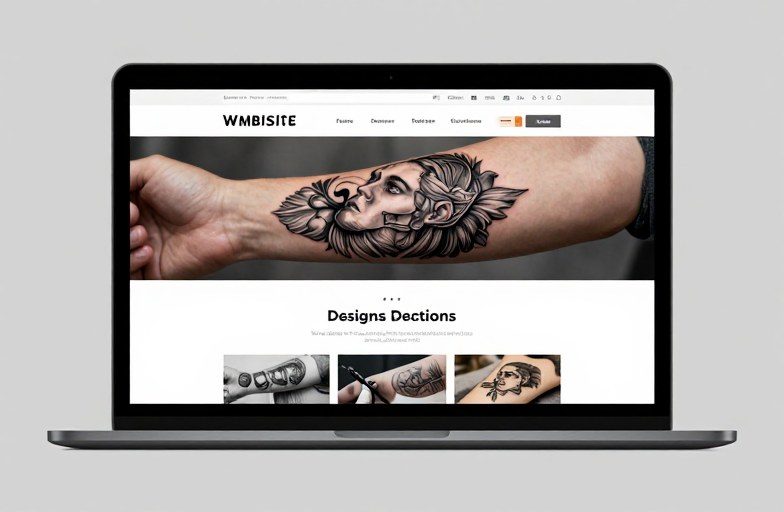
Website tattoos tend toward rectangular or horizontal compositions, which limits placement options. The natural canvas of a forearm’s inner or outer face accommodates a browser window beautifully. Thighs offer similar horizontal real estate with less visibility concern.
- Forearm (outer): Classic visibility, horizontal browser window reads naturally, easy to show or cover.
- Forearm (inner): More private, skin here stays paler and finer-lined work holds better than on sun-exposed outer arm.
- Calf: Vertical layouts possible, good for mobile phone mockups or scrolling page metaphors.
- Ribcage: Horizontal space for wider compositions, but movement and stretching distort rectangular designs over time.
- Thigh: Flat, stable skin; ideal for detailed wireframes or larger “screens.”
Avoid curved surfaces like the upper arm or shoulder for anything meant to look like a flat screen. The distortion undermines the entire concept.
How to Personalize It
The generic browser window tattoo, Chrome frame, Google homepage, already feels dated and impersonal. The stronger move references something specific to your experience.
URL as Text Element
A meaningful domain, rendered in a typeface you actually used, carries weight. The early-2000s Verdana of your first blog. The monospaced font from your terminal. Consider how the text ages: blocky, evenly-weighted letterforms survive better than hairline scripts. All-caps URL structures often read cleaner than mixed case with descenders that risk bleeding together.
Functional Easter Eggs
Some designs hide personal data in plain sight: a 404 page that references an inside joke, a status bar loading to 99% (never completing, which is honest), a cursor hovering over a button labeled with a nickname or date. These reward close inspection without requiring explanation.
Popular Styles
Website imagery translates through several tattoo approaches, each with distinct aging characteristics.
- Traditional/Americana: Surprisingly effective for browser icons or “www.” banners. Thick outlines and limited color palettes read instantly and age gracefully. A globe icon in traditional style feels vintage-futuristic in a way that works.
- Blackwork/Graphic: Clean, high-contrast browser windows, cursor icons, or loading symbols. The solid blacks stay readable; the negative space stays skin-toned. Best for designs that need to read from distance.
- Fine Line/Single Needle: Code snippets, wireframe boxes, delicate scrollbars. Requires larger scale and touch-ups. The ethereal quality suits ephemeral digital concepts, but commit to maintenance.
- Glitch/Abstract: Pixel sorting, RGB channel separation, corrupted file aesthetics. These intentionally embrace distortion, making them forgiving of both skin’s texture and time’s softening.
- Neo-Traditional: Ornate browser frames, decorative address bars, stained-glass loading icons. Allows for color and complexity while maintaining structural legibility.
Standout Design Ideas
Beyond the obvious browser screenshot, specific web elements carry visual power when isolated.
Terminal and Command Line
Green or amber text on black, monospaced, blinking cursor, perhaps a single command and its output. The retro-computing aesthetic has cultural weight beyond personal nostalgia. Works as a band around the forearm or a vertical panel on the calf. The color palette is inherently limited, which aids longevity.
Broken or Arcane Elements
The “under construction” GIF, the broken image icon, the early web’s “Best viewed in Netscape” badge. These function as cultural artifacts, not just personal references. A skilled artist can render them with intentional flatness that mimics screen glow, or with dimensional shading that treats them as physical objects.
Interactive UI as Static Image
A toggle switch in the “on” position. A slider dragged to maximum. A checkbox, checked. These small interactions contain narrative without needing explanation. The visual language is universal to anyone who’s used software in the last thirty years.
Matching & Pairing Ideas
Website tattoos pair naturally with adjacent tech or communication imagery, but the strongest combinations create dialogue between elements.
A browser window on one forearm and a server rack or database symbol on the other, client and server, request and response. Two people might split a URL: one carries “https://,” the other the domain. The pairing works because the web is inherently about connection.
For solo compositions, consider the hardware-software relationship. A hand holding a phone displaying a specific site; a laptop with your actual homepage visible on its screen. The device grounds the digital in physical space, and the contrast between machine realism and screen flatness creates visual interest.
Less literally, pair with typography-focused tattoos. A font specimen sheet, a letterpress block, a Linotype keyboard. The web exists in the lineage of printed communication, and the juxtaposition honors that history without being literal about it.
What to Remember
Website tattoos age like any other, but carry additional risk: the technology they reference becomes obsolete, then retro, then potentially embarrassing. The 2006 Flash animation you loved is now unplayable. The platform you tattooed got sold and redesigned into something unrecognizable. Design for longevity by focusing on universal web language, cursors, scrollbars, basic markup, rather than specific products or trends.
Black and gray ages more predictably than color, though the amber/green terminal palette has proven durable. Avoid actual screenshots; interpret the interface through a tattoo lens. Thick lines, clear hierarchy, intentional negative space. Your skin is not a retina display. Work with that limitation rather than against it.
Finally, the best website tattoos acknowledge that the web was always human-made. Code is poetry written by people. A tattoo of a loading bar stuck at 47% can be about frustration, about patience, about the particular melancholy of digital incompletion. The image carries whatever you bring to it. The craft is in making it readable for decades, not in explaining what it meant the day you got it.
Frequently Asked Questions
Will a tattoo of actual code blur and become unreadable over time?
Small text always risks softening, but monospaced fonts with even stroke weights age better than scripts with thin ascenders. Plan for touch-ups every few years, and size code blocks at least six inches wide for any legibility past the first decade.
Can I get a tattoo that looks like it’s actually glowing like a screen?
Tattoo ink doesn’t emit light. Some artists create convincing glow effects through white ink highlights and surrounding dark shading, but this reads as “suggested glow” rather than actual illumination. White ink also yellows or fades faster than darker pigments.
Is it weird to get a tattoo of a website that no longer exists?
Not at all, obsolete sites carry specific emotional weight. The tattoo documents your relationship to that moment, not the site’s current functionality. Many strong web tattoos reference GeoCities, early blogs, or defunct platforms precisely because they’re time capsules.
How do I find an artist who can handle technical, precise designs?
Look for portfolios showing clean linework, geometric accuracy, and lettering. Graphic designers who transitioned to tattooing often excel at interface-inspired work. Ask specifically about their experience with straight lines and consistent spacing, skills that separate technical tattoos from softer organic styles.